Password Entropy Explained: How to Measure Real Password Strength
Table of Contents
- 1. What Password Entropy Actually Measures
- 2. The Password Entropy Formula
- 3. Character Sets: Where Entropy Comes From
- 4. The xkcd Lesson: Length Beats Complexity
- 5. What NIST Says About Password Strength
- 6. How Many Bits of Entropy Should a Password Have?
- 7. Entropy vs. Real-World Crack Time
- 8. How to Use a Password Entropy Calculator
- 9. 5 Mistakes That Destroy Your Entropy
"P@ssw0rd123!" looks strong, doesn't it? Uppercase, lowercase, digits, a symbol, twelve characters. Most password meters give it a green bar and a thumbs-up. And yet an attacker with a decent wordlist will crack it in seconds, because every one of those clever substitutions — @ for a, 0 for o — is in the attacker's dictionary too.
The problem isn't the password meter. It's that length and complexity rules are a terrible proxy for what actually matters: password entropy. Entropy is the single number that tells you how many guesses an attacker needs, on average, to find your password. Once you understand it, you'll never look at a "strong password" the same way again — and a good password entropy calculator becomes the fastest way to check whether yours is genuinely strong or just cosmetically strong.
What Password Entropy Actually Measures
Password entropy is a measure of unpredictability, expressed in bits. One bit of entropy doubles the number of guesses an attacker needs: a password with 30 bits of password entropy takes about a billion guesses (230), while 60 bits takes about a quintillion (260). Every extra bit doubles the attacker's work — which is why entropy is the only honest way to answer "how strong is my password?"
This is the crucial distinction most people miss. A password's length and its character variety are ingredients; entropy is the finished dish. "Tr0ub4dor&3" has 11 characters from four character classes, yet its real-world entropy is closer to 28 bits than the 70+ bits the naive math suggests — because attackers don't guess randomly. They guess the way humans actually pick passwords: dictionary words, common substitutions, predictable patterns. Shannon entropy (the textbook formula) assumes each character is chosen independently and uniformly at random. Human-chosen passwords violate that assumption spectacularly.
That's why security professionals distinguish between theoretical entropy (what the password entropy formula gives you) and effective entropy (what an attacker actually faces). A password entropy checker that just applies the formula to your input will happily report 80 bits for "Qwerty123!@#" — and be dangerously wrong. The Toolenix Password Entropy & NIST Strength Analyzer accounts for patterns, dictionary words, and keyboard walks, which is what separates a real analyzer from a naive character-counting widget.
The Password Entropy Formula
The classic password entropy formula is beautifully simple:
Entropy (bits) = L × log2(N)
where L is the password length and N is the size of the character pool. A 12-character password drawn from all 94 printable ASCII characters gives 12 × log2(94) ≈ 12 × 6.55 ≈ 78.6 bits. That's the number you'll see when you calculate password entropy with the standard formula.
Here's how to calculate password entropy by hand in three steps. First, count your character pool: lowercase letters give 26, adding uppercase makes 52, digits make 62, and common symbols push it to about 94. Second, take the base-2 logarithm of that pool size (log2(94) ≈ 6.55 bits per character, log2(62) ≈ 5.95, log2(26) ≈ 4.7). Third, multiply by the password length. An 8-character all-lowercase password: 8 × 4.7 ≈ 37.6 bits. A 16-character mixed password: 16 × 6.55 ≈ 104.8 bits.
The formula is exact — for randomly generated passwords. Memorize its limits: it measures the size of the haystack, not whether your needle is sitting on top of it in plain sight. "Password123!" scores about 72 bits by the formula and falls to a dictionary attack in milliseconds. Use the formula to size up generator output, never to grade something your brain invented.
Character Sets: Where Entropy Comes From
Every character class you add expands the pool N in the entropy formula — but the gains are smaller than most people think, because the relationship is logarithmic. Going from lowercase-only (26) to lowercase + uppercase (52) adds exactly 1 bit per character. Adding digits (62) adds about 0.25 more bits per character. Adding symbols (94) adds roughly another 0.6 bits per character.
Put concretely: an 8-character lowercase password has ~37.6 bits. Make it mixed-case and you get ~45.6 bits. Add digits and symbols and you reach ~52.4 bits. Notice that adding four more characters (going from 8 to 12 lowercase characters) buys you ~18.8 bits — more than all the character-class upgrades combined (~14.8 bits). Length scales linearly; pool size scales logarithmically. This is the math behind every "longer is stronger" claim you've ever heard.
There's a practical takeaway for anyone using a password entropy calculator: when the tool shows you the per-character entropy of your pool, small pool differences barely move the needle. Switching from a 62-character pool to a 94-character pool on a 12-character password gains you about 7 bits. Adding two more characters gains you 13. If you're designing a password policy, mandate length first and complexity second — which is exactly what NIST now recommends.
The xkcd Lesson: Length Beats Complexity
The most famous illustration of password entropy ever made is xkcd #936: "correct horse battery staple." Four random common words — 44 bits of entropy by the comic's math — versus "Tr0ub4dor&3", an 11-character monstrosity with only ~28 bits of effective entropy. The passphrase is easier to remember and harder to crack. The xkcd password entropy argument has held up remarkably well for over a decade.
Why does it work? A dictionary of ~2,000 common words gives about 11 bits per word (log2(2048) = 11). Four words: 44 bits. Five words: 55 bits. Six words: 66 bits. Each word you add is worth roughly two extra random characters from the full ASCII set — but words are vastly easier for humans to remember and type correctly. This is why modern password guidance, and most password managers, generate passphrases rather than character soup.
The caveat the comic glosses over: the words must actually be random. "iloveyou" + "football" + "dragon" + "monkey" is four common words with near-zero effective entropy, because attackers try common-word combinations early. A proper passphrase generator picks from a large wordlist with a real random source. When you check password entropy for a passphrase, make sure the calculator treats word-based passwords correctly — naive per-character math underestimates good passphrases and overestimates bad ones.
What NIST Says About Password Strength
NIST Special Publication 800-63B — the US federal standard for digital identity — rewrote the password rulebook, and its nist password entropy guidance is worth knowing. The headline changes: no more mandatory complexity rules (the uppercase/lowercase/digit/symbol dance), no more forced periodic rotation, and a minimum length of 8 characters with support for at least 64.
Why the reversal? NIST concluded that complexity rules produce predictable behavior: users pick "Password1!", then "Password2!" at the next rotation. Forced changes make passwords weaker, not stronger. Instead, SP 800-63B requires verifiers to check new passwords against known-compromised lists — breached passwords, dictionary words, and repetitive or sequential patterns. Strength comes from screening out the bad, not from mandating the decorative.
The standard also killed password hints and knowledge-based verification (your first pet's name is public record now). For memorized secrets, NIST's effective bar is roughly: long enough, not on a blocklist, and stored properly (salted, hashed, with a memory-hard function). A password entropy checker aligned with NIST guidance — like Toolenix's analyzer — grades against these real-world criteria rather than the old complexity checklist.
How Many Bits of Entropy Should a Password Have?
So how much entropy should a password have? The honest answer depends on what it protects and how the attacker gets at it. Here's the password entropy chart the industry roughly converges on:
- Below 40 bits — crackable in seconds to minutes on a single GPU. This is "Password123!" territory. Never use for anything.
- 40–60 bits — hours to months against a determined attacker. Acceptable for low-value accounts with rate limiting, risky for anything important.
- 60–80 bits — years to centuries. The practical sweet spot for master passwords and high-value accounts. A 12-character random password from the full ASCII set (~79 bits) lives here.
- 80+ bits — effectively uncrackable by brute force with any foreseeable hardware. This is where generated passwords and long passphrases land.
- 128 bits — the cryptographic gold standard (equivalent to an AES-128 key). Overkill for a human-memorized password, routine for generated secrets and tokens.
Context matters enormously. An online login with rate limiting and lockouts can survive on 40–50 bits, because the attacker can only try a handful of guesses. An offline hash dump — where the attacker can try billions of guesses per second — needs 70+ bits. Your password manager's master password protects every credential you own; give it 80+ bits (a 6-word passphrase or 14+ random characters) and never reuse it.
When you check password entropy with an online tool, compare the result against these bands rather than the tool's color alone. A "strong" label on a 45-bit password is only strong relative to the average password — which, to be blunt, is "123456."
Entropy vs. Real-World Crack Time
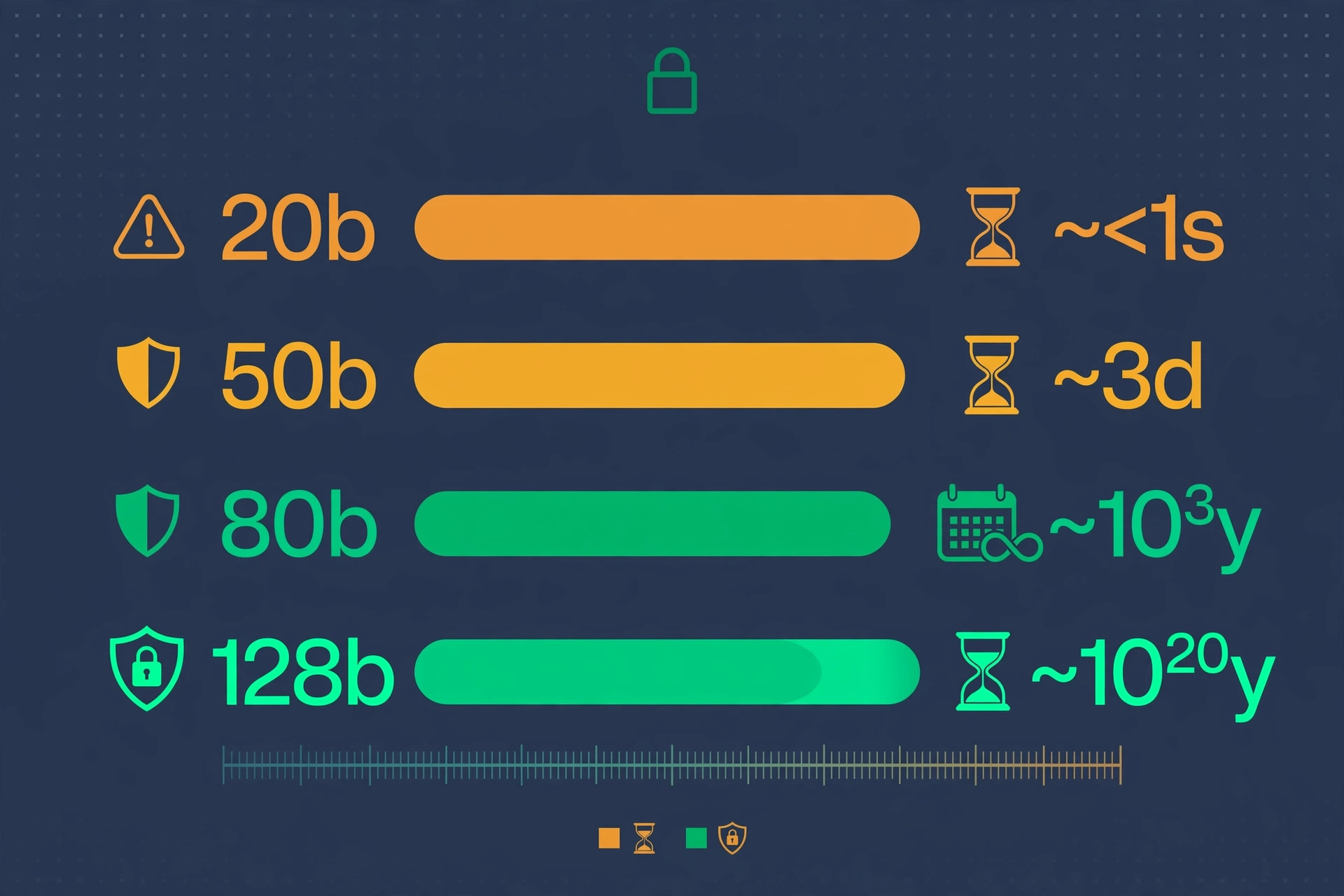
Bits are abstract; crack time makes them visceral. The conversion depends on the attacker's guess rate. A single modern GPU tries roughly 10–100 billion password hashes per second against fast hashes (and far fewer against slow, salted ones — which is why proper storage matters). At 100 billion guesses per second:
- 40 bits (~1 trillion combinations) — about 10 seconds on average.
- 50 bits (~1 quadrillion) — about 3 hours.
- 60 bits (~1 quintillion) — about 4 months.
- 70 bits — about 375 years.
- 80 bits — about 380,000 years.
Every 10 bits multiplies the crack time by roughly 1,000. That's the power of the exponential: the jump from 50 to 60 bits is the difference between an afternoon and a season.
Two reality checks. First, these are brute-force numbers — dictionary and pattern attacks collapse effective entropy long before brute force matters, which is why "Tr0ub4dor&3" dies in seconds despite its theoretical bits. Second, offline attacks only happen after a breach exposes hashed passwords; salting and slow hashes (bcrypt, Argon2) slash guess rates by orders of magnitude. Entropy is your last line of defense, not your only one — enable two-factor authentication everywhere it matters, because even 80 bits can't save you from a phishing page.
How to Use a Password Entropy Calculator
A password entropy calculator turns the theory above into a number for your password. Here's how to use one well:
- Type, don't paste, your real password? No — never enter a live password into any website, even a client-side one. Test a similar-construction password instead (same length, same pattern, different actual characters). Toolenix's analyzer runs 100% in your browser with nothing sent to a server, but the habit of never typing real credentials into third-party pages is worth keeping.
- Read the bits, not just the label. Look for the actual password entropy bits figure. Compare it against the 40/60/80 bands from the chart above.
- Check the breakdown. A good analyzer shows why — dictionary hits, keyboard patterns, repeats, sequences. If it flags your password as containing a dictionary word, believe it: attackers have the same dictionary.
- Test candidates before adopting them. Generating a new passphrase? Run three or four candidates through the password entropy checker and pick the strongest memorable one.
- Re-check after tweaks. Added a word to your passphrase? Verify the bits actually went up. Sometimes a "clever" tweak adds less than you'd think.
One more thing a calculator can't tell you: whether the password is already in a breach database. Entropy measures guessability, not exposure. Pair your entropy check with a breach lookup (like Have I Been Pwned's password checker) for the full picture — a 70-bit password that's been leaked is worth zero bits.
5 Mistakes That Destroy Your Entropy
1. Leet-speak substitutions. "P@ssw0rd" has essentially the same entropy as "password" — every substitution table ever invented ships inside cracking tools. Complexity theater, zero bits gained.
2. Appending "123!" to everything. Attackers try common suffixes and prefixes first. Your base word's entropy plus ~4 bits for the suffix is the reality, not the formula's fantasy.
3. Keyboard walks. "qwertyuiop", "1qaz2wsx", "zxcvbnm" — pattern dictionaries contain every walk on every major layout. Ten characters, maybe 15 bits of effective entropy.
4. Reusing a strong password. Entropy doesn't survive reuse. One breach exposes it everywhere it was used. Unique passwords per site (via a manager) beat one heroic password used thirty times.
5. Trusting the green bar. Naive strength meters reward character variety and punish passphrases — the exact opposite of what the math says. Always verify with a real entropy figure from a proper analyzer, and sanity-check memorable passwords against the xkcd logic: count the random choices, not the characters.
Try it free — no sign-up
Check your password's real entropy in seconds. Everything happens in your browser.
Open the Password Entropy & NIST Strength AnalyzerFrequently Asked Questions
What is password entropy?
Password entropy is a measure of a password's unpredictability, expressed in bits. Each bit doubles the number of guesses an attacker needs: 40 bits means about a trillion guesses, 60 bits about a quintillion. It's the single most honest measure of password strength because it quantifies the attacker's actual work, unlike length or complexity rules which are only rough proxies.
How to calculate password entropy?
Use the formula: entropy (bits) = password length × log₂(character pool size). A 12-character password from 94 printable ASCII characters gives 12 × 6.55 ≈ 79 bits. For a quick answer, use a password entropy calculator — but remember the formula assumes truly random choices, so it overestimates human-invented passwords with dictionary words or patterns.
How many bits of entropy should a password have?
Aim for at least 60 bits for important accounts (years of brute-force resistance), 80+ bits for master passwords and anything protecting an offline-attackable hash (centuries of resistance), and 40–50 bits minimum for low-value logins with rate limiting. A 6-word random passphrase (~66 bits) or 14 random ASCII characters (~92 bits) comfortably clears the bar.
How much entropy should a password have for a password manager master password?
Your master password guards every credential you own, so give it 80+ bits: a 6–7 word random passphrase or 14+ fully random characters. Never reuse it anywhere else, and pair it with two-factor authentication on the vault itself. This is the one password worth memorizing at maximum strength.
Are online password entropy checkers accurate?
Good ones are — provided they detect dictionary words, keyboard patterns, and repetitions rather than just applying the naive formula. A checker that reports 80 bits for "Qwerty123!@#" is lying to you. Also never type a real, in-use password into any website; test a similar-construction stand-in instead, even on client-side tools.
Does adding a symbol really make my password stronger?
Barely. Expanding the pool from 62 to 94 characters adds about 0.6 bits per character — on a 12-character password, roughly 7 bits total. Adding two more characters gains about 13 bits. Length beats complexity almost every time, which is why NIST dropped mandatory complexity rules in SP 800-63B.